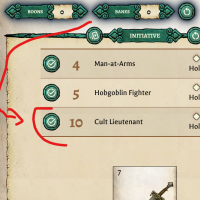
Search results
-

Help Me Figure Out Roll20
You're welcome, I hope this is helpful in getting you started! Having a kind of love/hate with Roll20 for many years, I know it can be cumbersome to learn!- TheHand
- Post #12
- Forum: *TTRPGs General
-
Help Me Figure Out Roll20
And one last thing before I have to depart for the "Real World", with your maps you can create "Fog of War" type hide masks. It's the 2 overlapping circles icon. Roll20 has a fancy dynamic lighting engine, but I never use it because it's too cumbersome and my players didn't appreciate it the...- TheHand
- Post #11
- Forum: *TTRPGs General
-
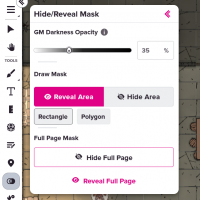
hide-reveal.png
- TheHand
- Media item
- Comments: 0
- Category: General
-
Help Me Figure Out Roll20
So as you well know, Dragonbane uses a card-based Initiative, and this is where it gets a little wonky with Roll20. You need to create a "Character" (I have one called Init Tracker"). Set the Sheet Type to "Party/GM", then click the little people icon in the upper right. Once you've created...- TheHand
- Post #10
- Forum: *TTRPGs General
-
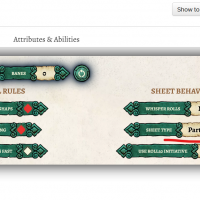
inittracker.png
- TheHand
- Media item
- Comments: 0
- Category: General
-
Help Me Figure Out Roll20
Now that you have some characters and tokens created, you can add them to the map just by dragging and dropping. By default only you as the GM can move the tokens around, so in the properties page you may need to grant your players permissions to move around their own characters or allied NPCs.- TheHand
- Post #9
- Forum: *TTRPGs General
-
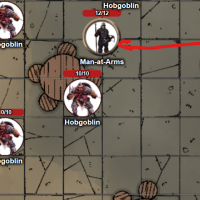
dragonbane-tokens.png
- TheHand
- Media item
- Comments: 0
- Category: General
-
Help Me Figure Out Roll20
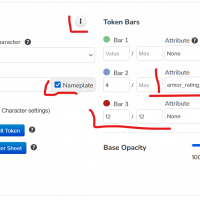
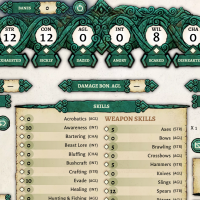
Once you have a character created, you can assign it a token by uploading a picture. To make my tokens with borders, I use a web page called Token Stamp 2, but it can be any picture. Once you have a token attached to your character sheet, you can edit it to link up to 3 bars with numbers you'll...- TheHand
- Post #8
- Forum: *TTRPGs General
-
tokenscreen.png
- TheHand
- Media item
- Comments: 0
- Category: General
-
dragonbane1.png
- TheHand
- Media item
- Comments: 0
- Category: General
-
Help Me Figure Out Roll20
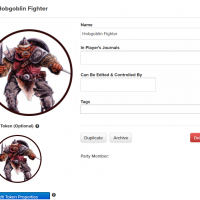
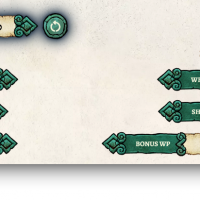
When you're ready to start creating characters and NPCs, you can click the "+ CHARACTER" button. The Dragonbane sheet will start off fairly minimal. Where it says "Sheet Type", you can change it to be a PC/NPC, Monster, or "Party/GM". I do wish it had a minimalist option for NPCs, but it creates...- TheHand
- Post #6
- Forum: *TTRPGs General
-
roll20-chars.png
- TheHand
- Media item
- Comments: 0
- Category: General
-
dragonbanesheettype.png
- TheHand
- Media item
- Comments: 0
- Category: General
-
Help Me Figure Out Roll20
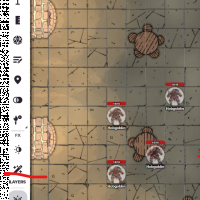
OK! Now that you have a Page built, take a look at the Layers. Roll20 has 3 main Layers, the GM layer (where objects can only be seen by the GM), the Map Layer (which will sit at the bottom and won't be interacted with by the players), and the Token Layer (where all your character and creature...- TheHand
- Post #5
- Forum: *TTRPGs General
-
roll20layers.png
- TheHand
- Media item
- Comments: 0
- Category: General
-
Help Me Figure Out Roll20
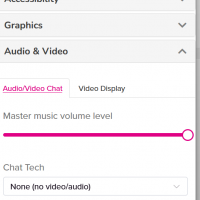
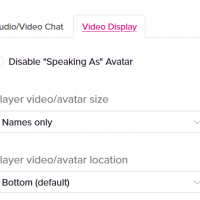
Oh and one thing that might be helpful for you and your players. In my games we use Discord for chat and voice, but Roll20 has its own built-in voice system. If you wish to disable it, click on the Gear Icon in the far upper right, choose Audio & Video, and under Chat Tech you can change it to...- TheHand
- Post #4
- Forum: *TTRPGs General
-
gear-icon-chat.png
- TheHand
- Media item
- Comments: 0
- Category: General
-
roll20avnames.png
- TheHand
- Media item
- Comments: 0
- Category: General
-
Help Me Figure Out Roll20
To control which Page your players can see, there is a Golden Ribbon. You can either click that and drag it onto the map you want to use, or right click on the desired page and choose "Move Party Ribbon Here"- TheHand
- Post #3
- Forum: *TTRPGs General